Posts

Showing posts with the label APPLICATIONS

Top Free and Best Android Music Player Apps with no Ads
Image
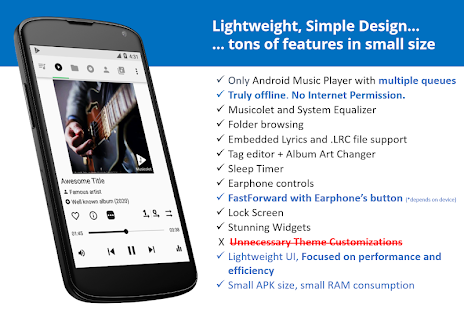
There are numerous free music player apps for Android available in the google play store, but they are showing lot of advertisements and they will ask many permissions. If you have a privacy concern and do not want to see the unwanted ads then below are the best and top Android Music Players which does not show any advertisements and they are available for free and they wont ask much permission. 1. Musicolet Music Player [Free, No ads] Musicolet is an ad-free music player and It has no In-App purchase and completely free music player app for android devices and it supports wide range of android versions. Musicolet Music Player got 4.7 out of 5 ratings and 1,000,000+ people already installed via Google play store as of today. Musicolet Music Player size is about 3.4 MB. Musicolet don't even use Internet permission (a.k.a. network access permission). (You can check this in 'Permission Details' at the bottom of our app-page in Play Store.) So it cannot send/receive...
How to disable / prevent automatic updates in Firefox browser

Image
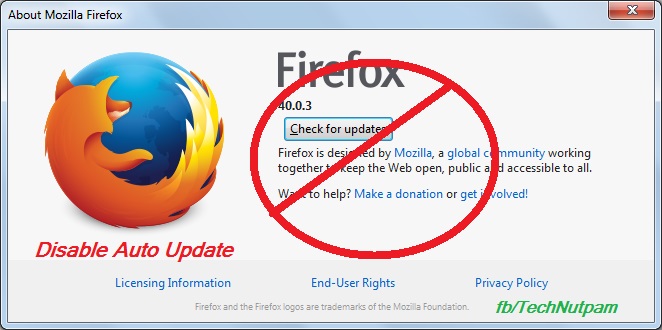
Mozilla always releases updates to add new features / solve security issues that exist in older versions of Firefox. In Firefox by default it may update automatically and install a newer version. When that happens, some of your add-ons may stop working. Some time because of our internet connection you may want to stop auto updates. Bellow are the steps to prevent automatic updates in Firefox browser. 1.  In Firefox menu bar Click Tools menu and select Options.  If you are not find menu bar then Press Alt+T in keyboard to get Menu bar. Else you can use Firefox's Open menu short-cut  in the top right side of fire fox then select "Options" Or type "about:preferences" in Firefox address bar 2. Click “Advanced” menu in Options 3. Select update Tab in “Advanced” menu 4. Now select "Never check for updates (not recommended: security risk)" options under Firefox updates. You can also select "Check for updates, but let me choose whe...

How to Get Invite for Google Inbox

Image
How to Get Invite for Google Inbox Google Inbox is the new way to organize your Emails using the concept of "Bundles". Google Inbox is a Google's email app with lot of futures and it is available for Android phones (4.1 and up), iPhone (iOS 7 and up), and Chrome browser on a computer. Currently, users can access Google Inbox through invitations only. How to get an invite for Google Inbox? There are two ways to get an invite for Google Inbox: Ask your friend who already using Gmail Inbox     People who already using Google Inbox  can able to send invites to their friends. When you get an invite from your friend, you'll be able to start using Inbox as soon as you download the Inbox app on your Android or iOS phone. Get an Invite from Google     You can request Google Team for invite by sending an email to inbox@google.com .  You will get an invitation email to use Google Inbox from the Gmail team. Below video will tell How G...

How to Enable / Disable or Remove WhatsApp Blue Tick marks (Read Receipts) for Read Messages

Image
WhatsApp recently introduced new update for android and iPhones to show two blue check marks (tick marks) next to the messages if the recipient has read your message. This feature is added with no privacy setting to disable read receipts.  Now In the latest version of WhatsApp (version 2.11.452) giving feature to enable or disable Blue Tick marks (Read Receipts). This Latest WhatsApp version 2.11.452 available to download in WhatsApp Official website. Following are the simple Steps to enable or disable Blue Tick marks  (Read Receipts) in WhatsApp. Step1: Go to the WhatsApp Official website ( www.whatsapp.com/Android/ ) and download the Official WhatsApp APK file. Step2: After download the apk enable installation of apps in settings. To enable,             Go to settings menu and enable ' Allow installation of apps from Unknown Sources ' in the Security tab under Unknown Sources. Step3: Inst...

Rail Radar Application in Indian railways-Easy way to find Train Location and its Timings

Image
Rail Radar Application in Indian railways-Easy way to find train location and its time by late Rail Radar Application using Google map introduced in Indian railways. This Application finds the exact location of the Indian Trains. This Application is available in online provided by Indian railways. By using this application we can find the exact location of the Trains and its way path. This application provides approximately 6500 train routes and its timings. When we provide train number or train name then this Application gives the full details about the train and its exact location.it also gives whether the train comes by late or right time.     Update : URL Changed to http://enquiry.indianrail.gov.in/ntes/ New Look: The URL link for Rail Radar Application is Given bellow  http://railradar.trainenquiry.com/