Posts

Showing posts with the label Microsoft

How to Turn off / Disable Automatic Updates in Windows 10

Image
From Windows 10, Microsoft made Operating system to automatically check and install all the updates  automatically. Windows 10 automatically receives all the new updates by default.But some time because of some reason may be if you have limited internet connection you may not want to update your Windows 10 Operating system. Some of the Windows 10 Editions like Professional and Enterprise have access to group policy and registry settings to delay the Updates. But For windows Home users do not have direct option to turn off downloading Automatic Updates. We have a way to stop updates from automatically downloading using the metered connection option. Steps to Prevent windows to download Updates automatically: Step 1:  In start menu go to Windows Settings and click Network and internet. In that open Wireless network setting by clicking Wi-Fi link in left menu or you can simply search for Change Wi-Fi settings in Start Menu or Cortana. Step 2: Click Advanced Options/ ...
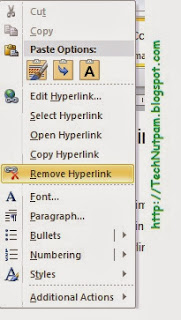
How to remove all hyperlinks in Microsoft Word

Image
When we work with Microsoft word Document sometimes we need to remove hyperlinks from Word document contents. It is not difficult to remove hyperlink from document. This Article lists two available methods in MS Word for removing all hyperlinks in Word Document. 1.       Remove hyperlinks one by one 2.       Remove all hyperlinks by using One Shortcut 1. Remove hyperlinks one by one In this Method you can remove hyperlinks One by One. Step1:              Right click on the hyperlink in Word document. Step 2:           Click  Remove Hyperlink  from right-click menu.  It is easy to remove a hyperlink in this way, but to remove all hyperlinks in the document will require much time of right-clicking and removing one by one. So if you want to remove All Hyperlinks in one simple method. 2. Remove all h...

Download New Genuine Microsoft Windows 8 Professional Edition with key

Image
Microsoft Windows 8 Professional edition is simply called as Windows 8 Pro is the new version of Microsoft’s Operating system which is launched on Nov 2012. You can download this Windows 8 Operating System and its key from Microsoft’s official Web Store . Note that using unofficial versions of Microsoft’s products and other Serial keys is punishable. Microsoft did not provide its operating system as Free of Cost. You can download applications for windows 8 from their websites and also you can use various free edition of software are available from their official websites.

Microsoft Launched Windows 8 Operating System

Image
Microsoft Launched Its Most awaited Operating System Windows 8 on 26-10-2012. Now Its Available in its Web Store for $39.99 Or you can buy Windows 8 Pro for $69.99 ERP at a participating retailer of Microsoft. This windows 8 Operating system provides New User Interface with power full experience to the tablet users as well as mobile user with touch Experience you can view the release preview video here To Download Microsoft Windows 8 Operating System From Web Go to the Microsoft’s Webstore and Click the buy windows 8 link . You can also download the Microsoft products for windows 8 from the Microsoft website.