Posts

Showing posts with the label GENERAL

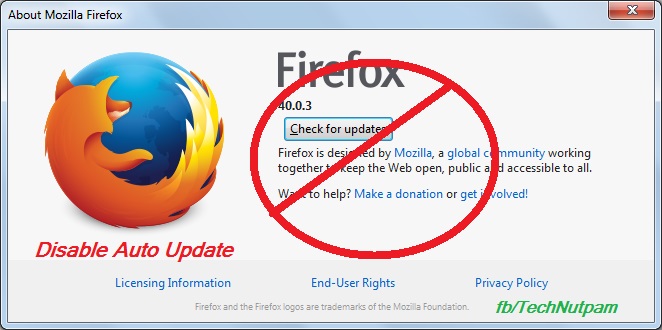
How to disable / prevent automatic updates in Firefox browser
Image
Mozilla always releases updates to add new features / solve security issues that exist in older versions of Firefox. In Firefox by default it may update automatically and install a newer version. When that happens, some of your add-ons may stop working. Some time because of our internet connection you may want to stop auto updates. Bellow are the steps to prevent automatic updates in Firefox browser. 1.  In Firefox menu bar Click Tools menu and select Options.  If you are not find menu bar then Press Alt+T in keyboard to get Menu bar. Else you can use Firefox's Open menu short-cut  in the top right side of fire fox then select "Options" Or type "about:preferences" in Firefox address bar 2. Click “Advanced” menu in Options 3. Select update Tab in “Advanced” menu 4. Now select "Never check for updates (not recommended: security risk)" options under Firefox updates. You can also select "Check for updates, but let me choose whe...

Google Celebrates its Birthday with Special Doodle 27 September

Image
Search engine king Google Officially celebrates its  Birthday on September 27  with its special Birthday special Doodle Logo. In January 1996 Two PhD students Larry Page and Sergey Brin  at Stanford University  created Google as a research project .  The domain name for Google was registered on September 15, 1997 and the company was incorporated on September 4, 1998. It was based in the garage California.  Craig Silverstein, a fellow PhD student at Stanford, was hired as the first employee. Currently Google has offices in more than 40 countries with more than 40000 Employees. From its 15-year anniversary Google started celebrating its Birthday celebrated on September 27, 2013, although it has used other dates for its official birthday. The reason for the choice of September 27 remains unclear. Whatever may be without Google life will became harder.. Google makes everything easy..  So Will Wish Google on its special day.   Happy Birthd...

Most Useful Keyboard Short Cuts For Microsoft Windows

Image
Most Useful Keyboard Short cuts For Microsoft Windows CTRL+C ( Copy) This Short cut used to copy the selected item and put it into the clipboard CTRL+X (Cut) This key board Short cut (ctrl + X) used to cut the selected item and put it into the clipboard CTRL+V (Paste) The paste option used to paste the copied or cut item from the clipboard CTRL+Z (Undo) The Undo used to go to the previous step DELETE (Delete) Delete key is used to delete the selected item and it will placed the item into the Recycle Bin SHIFT+DELETE Delete the selected item permanently without placing the item in the Recycle Bin CTRL while dragging an item This will Copy the selected item CTRL+SHIFT while dragging an item This method used to Create a shortcut for  the selected item F2 key F2 key I used to Rename the selected item or file CTRL+RIGHT ARROW This is used to Move the insertion point to the beginning of the next word CTRL+LEFT ARROW ...

Google talk – Adding Screen Sharing - How to Add Screen sharing in Google Talk

Image
Google Talk is widely used by many users around the world. Many nice features can be added to it including screen sharing. This article explains how to use Screen Sharing from Yuuguu with Google Talk. What is Screen Sharing? Screen sharing technology is used to see the activities and functions (work) done on one computer from another computer. This technology is used in various fields of work for doing their work in a better way. For example, it is used for troubleshooting computers, working with office staff, teaching computer-related subjects through the Internet, etc. This technology can also be used to present live software demos. This article is about adding screen sharing feature to Gtalk to do screen sharing in a more safe and user friendly way. Why Should We Add Screen Sharing to Gtalk You may ask me why the screen sharing feature should be added to GoogleTalk when there are many other options? The software which provides screen sharing facility ...

How to Insert Symbols in Facebook Status messages

Image
In Facebook or twitter when you putting   a status message or your twit or Facebook status, comments, or your messages , most of the times you may want to insert symbols i.e. special characters or smileys like Love ♥ Symbol Copyright © Symbol, Registered ® Symbol or Trademark ™ Symbol or currency symbols (¥, £, ¢, etc.) or any Special Symbols ( ¤ ª ß ⅔ ⍵ ⍺ ① ☹ ♞ ♚ ♠ ♬ ♪ ☭ ☁ ☼ ♥ ☊ « ☺ » º ) which is not available in keyboard. It is possible to insert such symbols in your status or messages. Just copy-paste symbols that you like into your status, comments, and messages. You can try to put symbols into Facebook name. From the following Symbols, just copy-paste symbols that you like into your Facebook status, comments or your messages. All Symbols: ©   «   ®    »   ☃   ☄   ★   ☆   ☇   ☊   ☋   ☌   ☍   ☎   ☏   ☚   ☛   ☜   ☝   ☞   ☢   ☣   ☤ ...